
How do you get started uncovering the best SEO keywords for your website?
What are the tools and techniques to understand the words and phrases your ideal customer is looking for when they search at Google?
And do keywords even matter in 2022?
We'll take a look at how to get started with SEO keywords, how to brainstorm new ideas for keywords, and how to use different tools to come up with new ideas in this article.
Are Keywords Still Relevant in 2022?
For years, Google has been telling us (website owners) to focus less on keywords and more on providing valuable content for our visitors. To encourage this behavior, Google has been removing keyword data from our Google Analytics for years, replacing specific keywords that were generating leads and sales with the nondescript “(not set)” and “(not provided).”
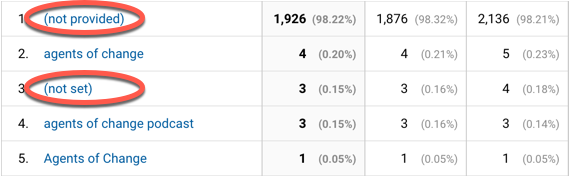
Google has also improved its semantic search results, meaning that Google understands that “foreign national” and “non-resident alien” are related, and a web page on the former may answer a query on the latter.
Google also looks at a lot of other factors in determining ranking, such as the number of inbound links a page has, the trust a website has built up, and the average time spent on the page, just to name a few. This may lead people to believe that keywords aren’t relevant any more.
However, “keywords” is just a fancy word for…“words.” And we always want to be using the language our ideal customers are using. (Remember that whole Tower of Babel thing? Never again.)
Even if Google understands the relationship between “rhinoplasty” and “nose job,” our prospects will respond more favorably to language they use and understand.
Choosing the right keyword for your page title can increase clickthrough rates in the SERPs (search engine result pages) which should increase your ranking over time.
So, yes: keywords still play a critical role in search engine optimization and your ability to turn visitors into leads and customers.
What Steps Are There In Keyword Research?
If you’re just getting started with SEO, or you’re in the process of redesigning your website, you may not know how to get started with keyword research.
In working with clients over the past 20 plus years, we’ve found that keyword research can be broken down into three important steps:
-
Brainstorming: generating a list of keywords that your ideal customers may be searching for.
-
Testing: using tools to measure how many people are searching on specific keywords, and what your competition (from other sites) is for those keywords.
-
Content creation: writing the copy and meta data that features and highlights your keywords.
In this post I’m going to focus on the first bullet point, brainstorming the keywords that will attract your ideal customer.
How to Brainstorm Keywords for SEO
The goal with brainstorming is to come up with as many keywords as possible that your prospects might use at Google. The trick is to not be critical of any ideas right now, but to just generate as many of them as you can.
You can start your brainstorming by yourself, with your team, or by bringing in some current customers and clients.
No idea is too strange, too narrow, too broad, or too random.
To generate as many usable keywords as possible, I use 5 perspectives when brainstorming keywords, and then I dig a little deeper. Here are the five perspectives that help generate the widest variety of potential keywords.
Brainstorming Keywords for Your Products and Services
This is the most obvious, and where most of us start. What are the products, services, or offerings that you bring to market?
If you’re a dentist from Boston, your list might include:
-
dentist
-
veneers
-
family dentistry
-
pediatric dentist
-
wisdom teeth removal
-
and so on.
I’d probably include “Boston” in conjunction with many of these terms, and potentially the neighborhood (Back Bay) and surrounding neighborhoods (Kenmore, Fenway,) where the practice resides.
You might also include related products and services that you don’t offer, but are related to your business such as “dental insurance.”
Which Keywords Describe Your Prospects’ Problems
Some people are fixated on their current situation, whether it’s “employee turnover” or “rotting drywall.” Once you’ve generated keywords that are all about you and your offerings, it’s time to take a walk in your customer’s shoes. What are the problems that your customers face before they start working with you?
Think about your current customer base. Why did they choose you? What were they struggling with when they first came through your door? How would they describe those problems?
If you get a lot of leads through your contact form, review those for pain points.
Flipping the Script: Keywords for Solutions and Benefits
Some people search on problems, others search on solutions. We want to help these people, too. What are the real or perceived solutions, benefits, or positive outcomes that your customers get from working with you?
Whether it’s “whiter teeth” or “greener grass” many people search on a desired outcome. They’re not searching for the means, they’re searching for the ends. If you included “stage fright” in the previous perspective, add “speak with confidence” now.
Brainstorming SEO Keywords Around Your Features
Although good sales people sell benefits and not features, that doesn’t mean people aren’t searching for “water views” or “sweatshop-free clothing.” On the web, everyone fancies themselves an armchair detective, doing as much preliminary research as possible.
People who search for specific features are often ready to make a purchase, and those are the kind of people you want to be in front of. They have their mouse in one hand and their wallet in the other.
Generate a list of all the features you have to offer whether it’s “four wheel drive,” “8.0 megapixel,” or “all inclusive.”
Should You Use Your Competitors as Keywords for SEO?
I’m not talking about the other orthodontist down the hall, and I certainly wouldn’t include any competitors’ trademarked names. However, there may be several ways your prospects might solve their problems, only one of which is yours. Brainstorm a list of all the ways people may overcome their current situation without engaging you.
Personal trainers may lose business to “treadmills,” costume shops “thrift stores,” and dog trainers to “invisible fences.” Whether you plan on debunking or co-opting these phrases, you want to be there when your prospects search for alternatives.
Niche Down Your Keywords with Descriptors and Modifiers
As you worked your way through these five perspectives, it’s likely that you already through in some descriptors or modifiers that better define your offerings.
It’s going to be nearly impossible for most entrepreneurs to rank well for broad terms such as “travel,” “dermatologist,” or “credit card.” To appear on page one of Google, you’re going to niche down.
Sure, there will be a fraction of searches for “Portland family friendly oyster bar” vs. “restaurant,” but those searches will be much more relevant and likely to convert.
Consider all types of modifiers to find these niches:
-
Location (city, state, or neighborhood,)
-
Age (child, adult, senior,)
-
Gender, (male, female, men, women, boy, girl…gender fluid)
-
Price point (bargain, mid-range, luxury)
-
and so on.
Bonus Round: Finding Keywords in the SERPs
You can come up with even more words by searching for some of your favorite keywords in Google.
The first place to look is in the search box itself, with Google’s “suggested search.” Type in something like “how to cook vegan” and Google provides a number of popular searches.

Further down the page, you might find a People Also Ask box, with related questions.
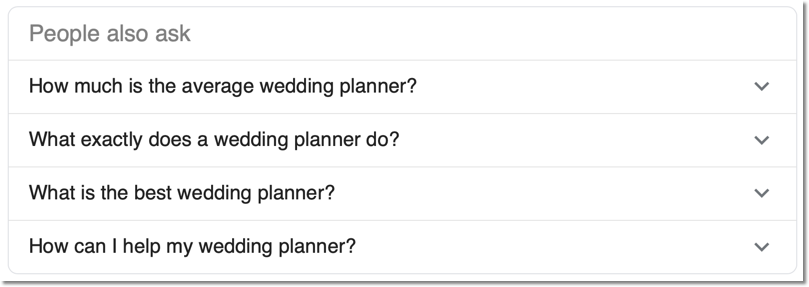
And at the very bottom of the page, you’ll find Searches Related To, which can generate even more keywords.
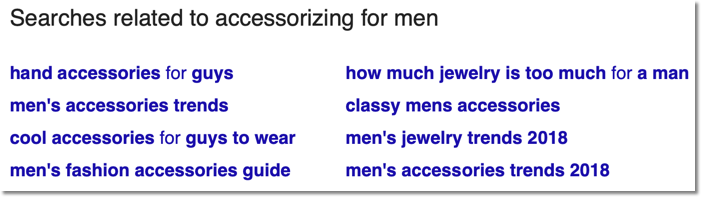
Discovering Top and Trending Keywords
Outside of the SERP, Google Trends offers more good keyword ideas. Google Trends is a tool that allows you to track and compare multiple keywords over time and by location. For brainstorming ideas, scroll down the page to find Top and Rising keywords.
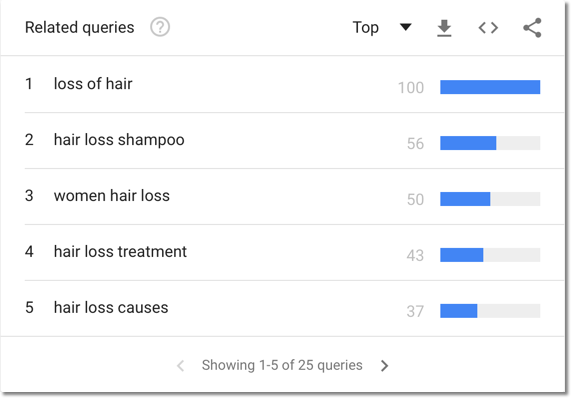
You can include these keywords in your list, and they may spur some additional brainstorming as well.
Organizing Your Keywords
By now you should have brainstormed a long list of keywords for SEO. Keywords that describe your offerings, your prospect’s problems and desired outcomes, specific features, and outlined any competitors you may face in the marketplace. In addition, you’ve dug a bit deeper and uncovered potential keywords from the SERPs and from Google Trends.
Now it’s time to organize these keywords based on your products and services. This will help you when it’s time to test these keywords in head to head competition.
As with any brainstorming exercise, there are no wrong answers. However, just because you think someone might be searching for “passive aggressive detective agency” or “mango-based alternative fuel” doesn’t mean they are. You’ll need to test your list with a keyword research tool to test your assumptions and re-write your website copy to include your most effective keywords in places where they will make a difference.
But that’s a topic for another day.
Need help brainstorming keywords for your SEO? Or do you need to analyze your keywords to determine which ones are most likely to attract and convert more of your ideal customers? Or are you looking for an SEO copywriter to create persuasive copy that ranks well?
Let us know where you’re looking for help today!